Review pull requests with Pi
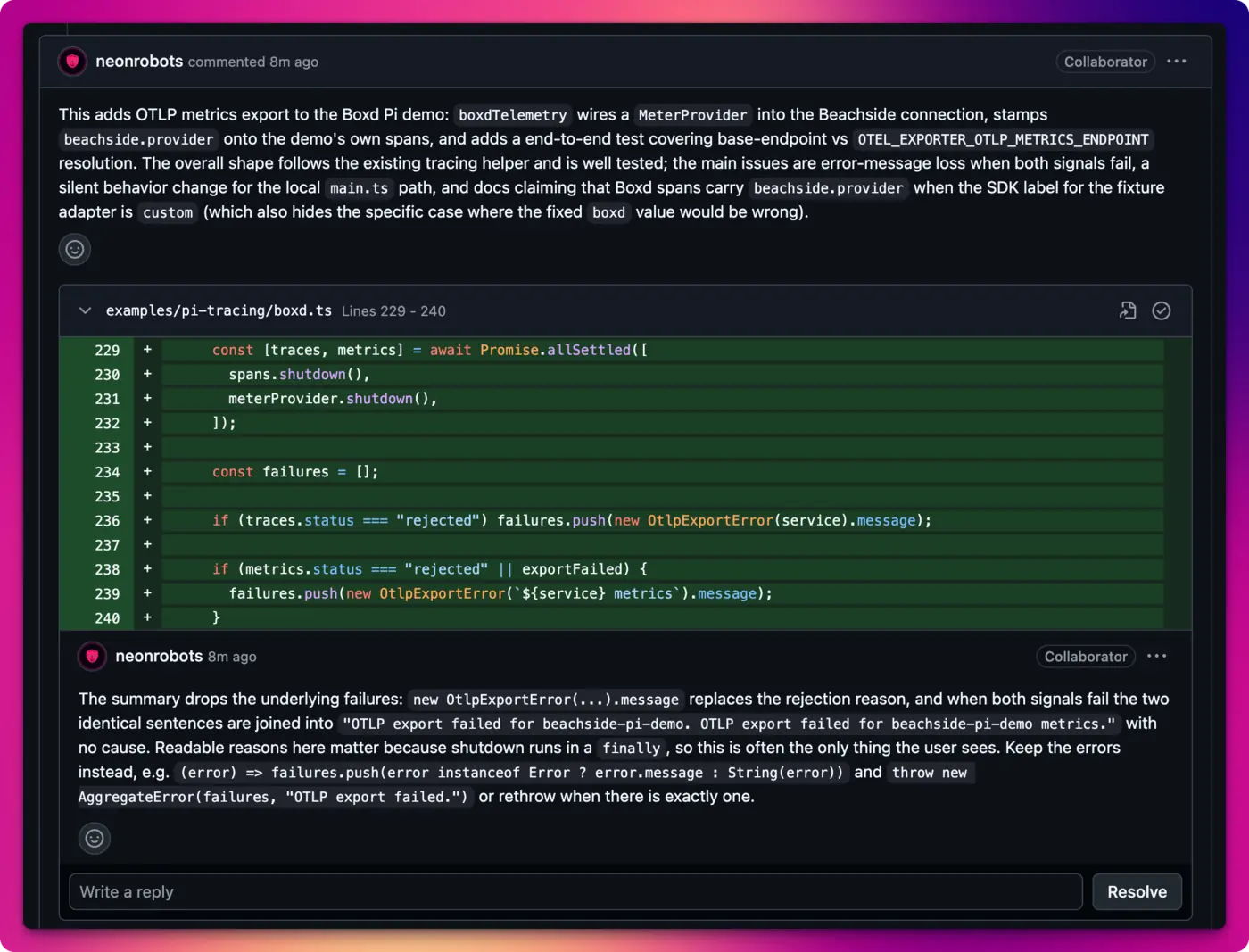
This recipe reviews each pull request when it is opened ready for review, or when a draft is marked ready. Pi runs in a Freestyle sandbox, reads the change in a clone of the repository without building or running it, and posts one comment-only review: a short summary plus an inline comment on each line it has a finding about.
The repository holds no GitHub or model keys. The job mints a credential broker grant with its own GitHub Actions OIDC token. The grant lets git and gh in the sandbox reach GitHub, and Pi reach the model gateway, through the broker. The only secret in the repository is the Freestyle API key, which stays on the runner.
Source: examples/pr-review, with the review workflow and the maintenance workflow.
A sample review
Section titled “A sample review”This is the review the recipe posted on a Beachside pull request that added OTLP metrics export to the Pi tracing example, as it looked when posted. See it on GitHub.
What you need
Section titled “What you need”- A Freestyle API key.
- A deployed credential broker you can configure.
- A fine-grained GitHub personal access token for the repositories to review, with Contents: read and Pull requests: write only. Reviews appear as the token’s owner, so a dedicated bot account reads best.
- A model gateway key: Kilo AI Gateway by default, or OpenRouter.
When it runs
Section titled “When it runs”The review job runs on pull_request_target for opened and ready_for_review, and only when all of these hold:
- the repository variable
PR_REVIEW_ENABLEDistrue; - the pull request is not a draft;
- the pull request comes from the same repository, never a fork;
- its author is an
OWNER,MEMBERorCOLLABORATORof the repository.
pull_request_target runs the workflow from the default branch, so a pull request cannot change the workflow or the scripts. The runner checks out only the default branch; the pull request is cloned inside the sandbox, through the broker. Later pushes do not start another review. Marking the pull request ready again after it went back to draft starts a new one.
How a review works
Section titled “How a review works”- Connect to Freestyle with the newest prepared image, or the plain
freestyle/ubuntu-smbase when there is none. - Create a sandbox with a 30-minute lifetime and a 30-minute grant for the GitHub and model integrations.
- Install Git, GitHub CLI, Node and Pi if the image does not have them already.
- Clone the repository, fetch the base branch and the pull request head, and check out the head.
- Write Pi’s model configuration from the grant’s gateway base URL.
- Run Pi with the
read,bash,grep,findandlstools, and ask it for exactly one comment-only review, which it posts withgh api. - Destroy the sandbox, which also revokes the grant.
The job passes when Pi exits 0 and cleanup succeeds. The review on the pull request is the output.
Set up
Section titled “Set up”1. Add the broker integrations
Section titled “1. Add the broker integrations”Store the GitHub token as an integration:
beachside broker integration create github-review --provider github --secret-stdin --allow-issue < /secure/path/review-tokenThen run beachside broker integration setup, choose Kilo AI Gateway and keep the ID kilo. To use OpenRouter instead, set up an openrouter integration the same way. See Model gateways.
2. Trust the workflow
Section titled “2. Trust the workflow”Add the review workflow to githubActions in the broker’s BROKER_CONFIG and deploy the broker again. Pick an audience unique to your deployment, and use your repository’s numeric IDs, name and workflow path:
{ "githubActions": { "audience": "https://broker.example.com/github-actions", "workflows": [ { "repositoryId": "123456789", "repositoryOwnerId": "987654321", "repository": "your-org/your-repo", "ref": "refs/heads/main", "workflowRef": "your-org/your-repo/.github/workflows/pr-review.yml@refs/heads/main", "event": "pull_request_target", "integrations": ["github-review", "kilo", "openrouter"] } ] }}Run beachside broker issuer allow github-review kilo openrouter if the issuer may not grant them yet, and beachside broker config show to check what the deployed broker trusts.
3. Add the workflows and scripts
Section titled “3. Add the workflows and scripts”Copy into your repository:
- the two workflows,
pr-review.ymlandpr-review-maintenance.yml, into.github/workflows/; review.ts,shared.ts,gateway.ts,image.tsandsweep.tsfromexamples/pr-review, keeping theexamples/pr-review/path the workflows run them from, or updating the paths in both workflows.
Add the packages the scripts import to your package.json:
bun add beachside @beachside/freestyle @beachside/credential-clientIn both workflows, keep bun install --frozen-lockfile, which now installs those packages from npm, and delete the bun run build:packages steps, which build them from source inside the Beachside repository.
4. Set repository secrets and variables
Section titled “4. Set repository secrets and variables”| Kind | Name | Value |
|---|---|---|
| Secret | FREESTYLE_API_KEY |
A Freestyle API key. |
| Variable | BEACHSIDE_BROKER_URL |
The broker’s HTTPS origin. |
| Variable | BEACHSIDE_BROKER_AUDIENCE |
The audience from the broker policy. |
| Variable | PR_REVIEW_ENABLED |
true to turn reviews, images and sweeps on. |
| Variable | PR_REVIEW_GATEWAY |
Optional: kilo (default) or openrouter. |
| Variable | PR_REVIEW_MODEL |
Optional: a model ID; defaults to deepseek/deepseek-v4.1-flash-1017. |
| Variable | PR_REVIEW_DEBUG |
Optional: true to print Pi’s full output in the job log. |
5. Build the first image
Section titled “5. Build the first image”Run PR review maintenance once from the Actions tab. It boots freestyle/ubuntu-sm, installs Git, GitHub CLI, Node and a pinned Pi, and captures a Freestyle snapshot that review jobs start from. Reviews work before the image exists; they install the tools first, which takes longer. The workflow rebuilds the image weekly.
Logs and secrets
Section titled “Logs and secrets”The job log shows the steps, Pi’s exit code and how much it printed, but not what Pi printed, because Actions logs of a public repository are public and a pull request could try to talk Pi into printing its environment. When Pi fails, the log shows the last 20 lines of its stderr. Anything shaped like a grant, GitHub token or model key is blanked out of everything logged. Set PR_REVIEW_DEBUG to true to print Pi’s full output, still redacted, and turn it off again afterwards.
The grant itself is the real boundary: it can only read code, post reviews and call the model, and it expires after 30 minutes. A spend limit on the gateway key caps the rest.
Cleanup
Section titled “Cleanup”Every resource expires on its own, so the cleanup steps are a backup:
| Resource | Expiry | Active cleanup |
|---|---|---|
| Review sandbox | 30 minutes after creation. | Destroyed when the review ends, even after a failure. An hourly sweep destroys any sandbox labelled beachside.pr-review that is older than an hour. |
| Grant | 30 minutes. | Revoked when the sandbox is destroyed. |
| Image snapshot | 14 days after capture. | Replaced weekly. |
| Image build sandbox | 30 minutes after creation. | Destroyed after capture, and covered by the sweep. |
The review job has a 30-minute timeout, so a runner that disappears mid-job leaves only resources that expire within 30 minutes.
Run it locally
Section titled “Run it locally”Outside Actions, set BEACHSIDE_BROKER_ISSUER_KEY instead of the audience, plus GITHUB_REPOSITORY, PR_NUMBER, PR_BASE_REF, BEACHSIDE_BROKER_URL and FREESTYLE_API_KEY, then run:
bun run --cwd examples pr-reviewThe review is posted for real. bun test examples/pr-review drives the review against a scripted sandbox and makes no provider, broker or model calls.
© 2026 Beachside Compute · Made by humans & in Texas