Credential broker
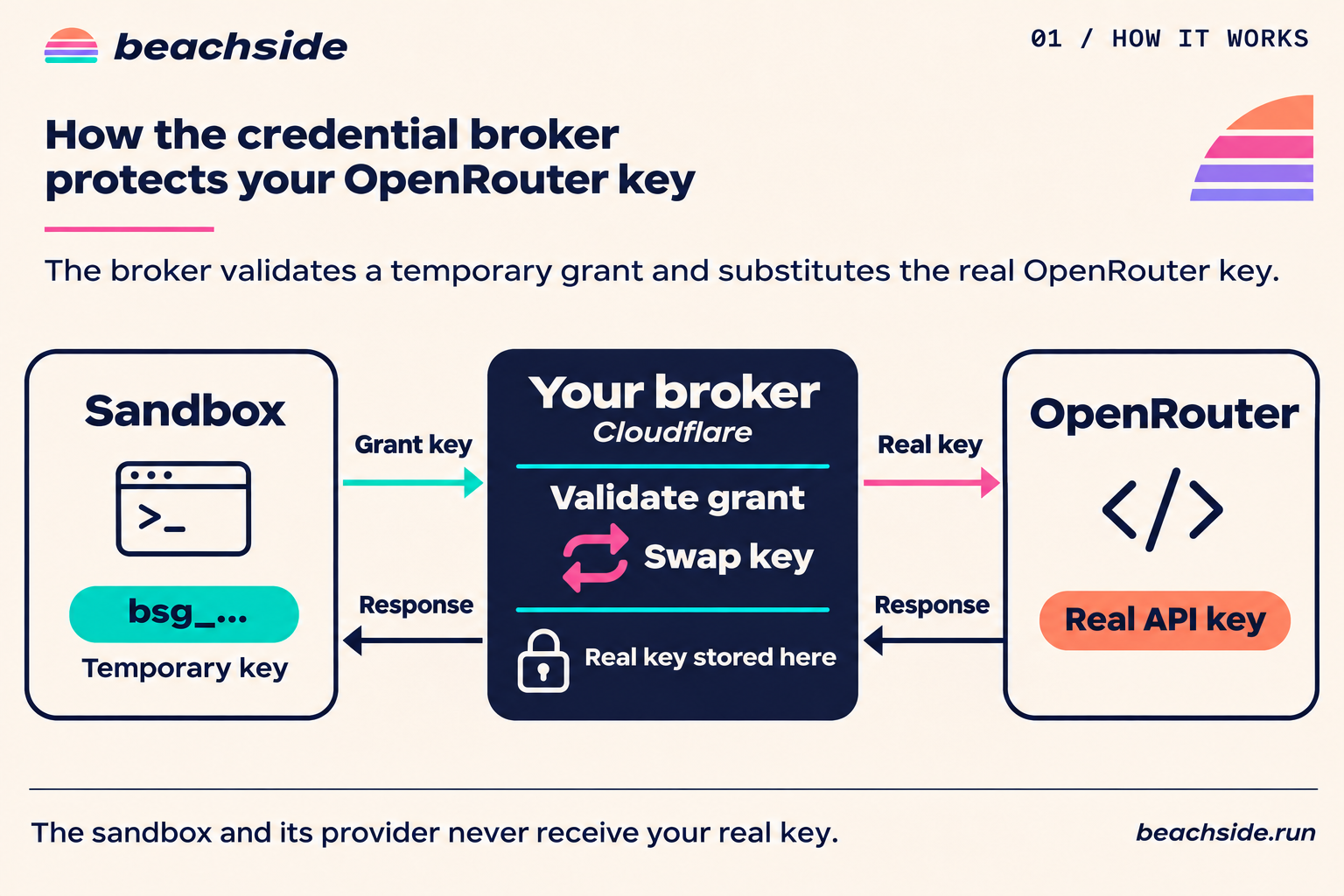
The Beachside credential broker stores upstream credentials and issues short-lived grants for sandbox workloads. Use the admin client or CLI to configure GitHub and HTTPS endpoint integrations. For an HTTPS endpoint, you choose the upstream base URL and the headers the broker sends.
Deploy the broker
Section titled “Deploy the broker”Configure three Worker secrets. BROKER_ADMIN_KEY authorizes integration and issuance settings. BROKER_ISSUER_KEY authorizes grant requests. BROKER_ENCRYPTION_KEYS maps version labels to base64url-encoded 32-byte encryption keys. The BROKER_ENCRYPTION_KEY_VERSION setting selects the active version for writes. Keep prior encryption versions configured until their stored credentials have been rotated. Worker deployment and bootstrap.
The new deployment starts with no integrations or issuer permissions. Add integrations and authorize issuance before launching a credentialed sandbox.
Set up runtime integrations
Section titled “Set up runtime integrations”Build a client tarball from the separate broker repository before installing it alongside the SDK.
git clone https://github.com/beachside-compute/credential-broker.gitcd credential-brokergit checkout 57e54957dc45c9bde315536ac7d5f33e0a6e984cbun install --frozen-lockfilebun run buildbun pm packIn your sandbox application, install beachside and the client tarball printed by bun pm pack.
npm install beachside /path/to/beachside-credential-client-0.1.0.tgzSee the credential broker repository for current installation and independent release instructions.
On the operator host, set BEACHSIDE_BROKER_URL to the Worker HTTPS origin and BEACHSIDE_BROKER_ADMIN_KEY to its BROKER_ADMIN_KEY. The installed beachside-broker CLI sends upstream credential values over HTTPS for encrypted storage. Its output contains integration metadata.
Start the model gateway setup wizard. Select OpenRouter and enter router-work as the integration ID to follow this guide. Presets fill in the same base URL and header configuration used for custom integrations. Model gateway recipes.
npx beachside-broker integration setupIf you also want to use GitHub, add the GitHub integrations on the operator host.
printf '%s' "$WORK_GITHUB_TOKEN" | npx beachside-broker integration create github-work --provider github --secret-stdinprintf '%s' "$TOOLS_GITHUB_TOKEN" | npx beachside-broker integration create github-tools --provider github --secret-stdinAuthorize issuance for the integration IDs you created. The issuance allowlist starts empty, and issuer set replaces the whole list. Running it with no IDs clears the list. GitHub Actions jobs also need permission in the deployed workflow policy.
npx beachside-broker issuer set router-worknpx beachside-broker integration listIf you created the GitHub integrations above, use this allowlist to authorize all three integrations.
npx beachside-broker issuer set github-work github-tools router-workFor GitHub and existing provider-specific integrations, declare the Worker secret binding name in BROKER_CONFIG.workerSecretBindings and pass --worker-secret CREDENTIAL_EXAMPLE in place of --secret-stdin to create or rotate a reference. Generic HTTPS integrations store their secret header values in the encrypted store. The admin API exposes these options through createCredentialBrokerAdmin() from @beachside/credential-client.
Give a sandbox a grant
Section titled “Give a sandbox a grant”On the trusted orchestrator host, use BROKER_ISSUER_KEY as the issuer API key. This example uses the optional github-work integration alongside router-work and assumes the connected Beachside client has a Linux image with Git and GitHub CLI. For a model-only setup, select your endpoint using the same endpoints mapping. Model endpoint example.
import { createCredentialBroker } from "@beachside/credential-client";
const broker = createCredentialBroker({  url: process.env.BEACHSIDE_BROKER_URL!,  auth: { apiKey: process.env.BEACHSIDE_BROKER_ISSUER_KEY! },});
await client.sandboxes.with(  {    network: "internet",    credentials: broker.sandbox({      github: "github-work",      endpoints: [        {          integration: "router-work",          baseURLEnv: "OPENROUTER_BASE_URL",          apiKeyEnv: "OPENROUTER_API_KEY",        },      ],      ttlSeconds: 900,    }),    setup: [["git", "clone", "https://github.com/acme/project.git", "/tmp/project"]],  },  async (box) => {    await box.exec(["gh", "api", "repos/acme/project", "--jq", ".full_name"]);  },);
Git uses the broker for HTTPS URLs under https://github.com/. For gh, the environment sets GH_HOST to the broker hostname and GH_ENTERPRISE_TOKEN to the grant. An explicitly selected github.com GitHub CLI host takes precedence over GH_HOST. Use gh api --hostname "$GH_HOST" or gh ... --repo "$GH_HOST/owner/repo" to explicitly select the broker. The Worker accepts supported GitHub routes. The configured upstream GitHub credential determines repository access and write permissions. See the broker route and permission reference.
For repositories owned by the GitHub account gateway, include the .git suffix in the HTTPS Git URL, for example https://github.com/gateway/project.git.
A broker can hold multiple GitHub integrations. Choose one per grant, such as github: "github-tools" for a sandbox working with the tools account. Git and GitHub CLI use that grant’s selected GitHub credential on the shared broker host. A grant can include HTTPS endpoints alongside GitHub.
GitHub Actions
Section titled “GitHub Actions”Set permissions: { id-token: write } in the job and configure the workflow’s exact identity, audience, and integration names in the broker’s OIDC rules. The requested integrations must also be on the admin issuance allowlist. Request the token on the runner hosting Beachside.
import { createCredentialBroker, githubActionsOidc } from "@beachside/credential-client";
const broker = createCredentialBroker({  url: process.env.BEACHSIDE_BROKER_URL!,  auth: githubActionsOidc({    audience: "beachside-broker",    env: process.env,  }),});
Model clients and OpenCode
Section titled “Model clients and OpenCode”Each entry in endpoints names a configured HTTPS integration and the two environment variables your client uses. The broker URL for an integration is https://<broker-host>/gateway/<integration-id>. The API key variable contains the temporary grant, which the client sends as Authorization: Bearer <grant> or x-api-key: <grant>. The broker authenticates the grant, then sends the request to the configured upstream URL with the headers you set. The upstream keys stay in the broker.
The client appends its request path to the broker URL. Register an upstream base URL with the path prefix your client expects. For example, if an OpenAI-compatible client appends /chat/completions, register OpenRouter with https://openrouter.ai/api/v1. The Anthropic SDK appends /v1/messages, so its matching upstream base URL is https://api.anthropic.com. Pass the broker URL explicitly when a client does not read the environment variable.
Existing provider-specific integrations can still use the shorthand properties on broker.sandbox().
| Integration property | Base URL variable | Token variable |
|---|---|---|
anthropic |
ANTHROPIC_BASE_URL |
ANTHROPIC_API_KEY |
openai |
OPENAI_BASE_URL |
OPENAI_API_KEY |
openrouter |
OPENROUTER_BASE_URL |
OPENROUTER_API_KEY |
With these shorthand properties, the OpenAI and OpenRouter URLs already include /v1. The Anthropic URL leaves it for the client to append.
For OpenCode V2, add the settings for the integrations your grant includes to the project’s opencode.json or .opencode/opencode.json. OpenCode resolves these variable references from its command environment. The OpenRouter entry works with the generic integration shown above. For the Anthropic entry, use the /v1 suffix shown here with the legacy Anthropic integration or with a generic integration whose upstream base is https://api.anthropic.com. OpenCode configuration guide, OpenCode provider guide.
OpenCode v2.2.7 also accepts the same JSON through OPENCODE_CONFIG_CONTENT in the environment of the sandbox command that starts OpenCode. Keep the {env:...} references so OpenCode resolves the broker URL and temporary grant at startup. OpenCode CLI environment variables.
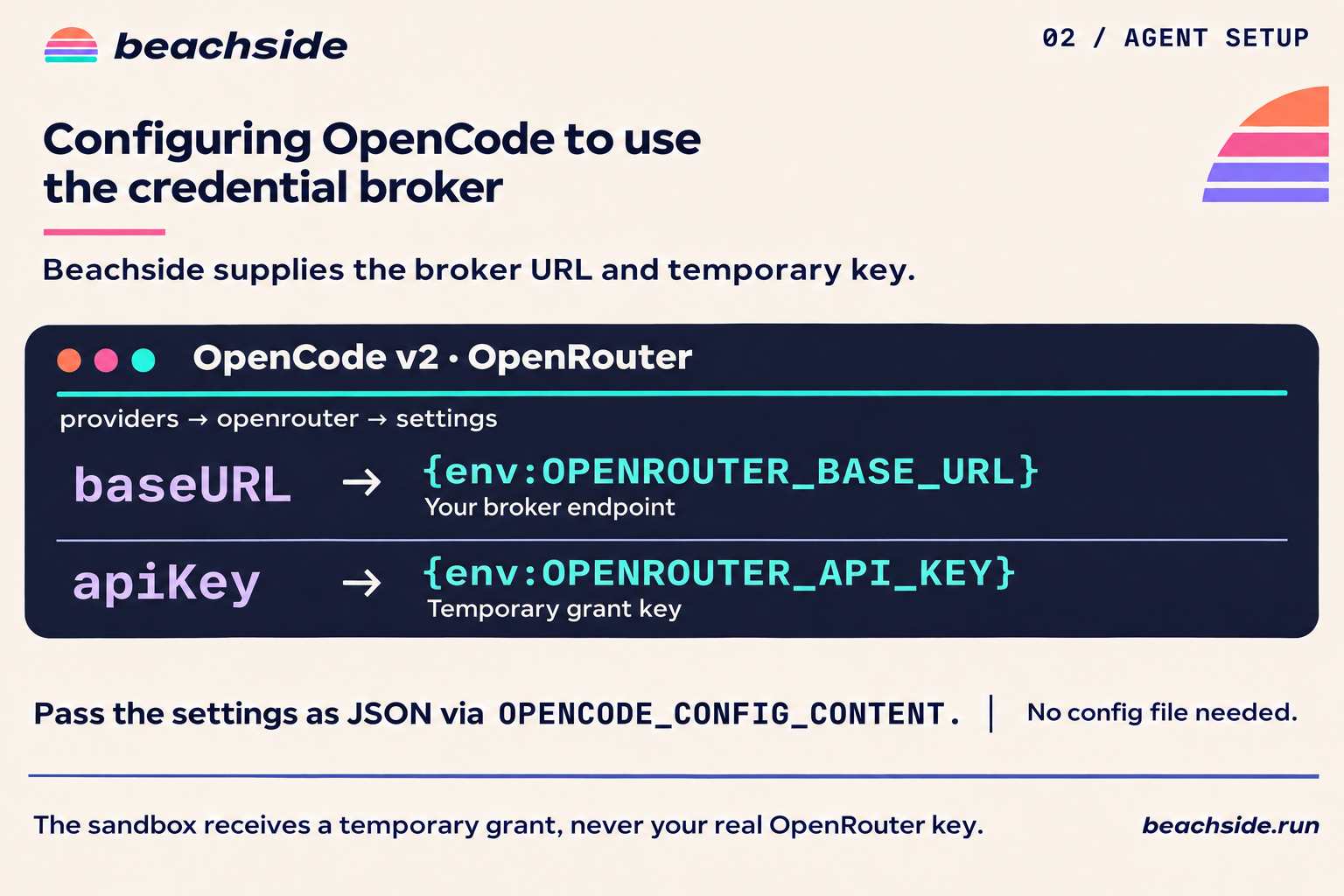
{ "$schema": "https://opencode.ai/config.json", "providers": { "anthropic": { "settings": { "baseURL": "{env:ANTHROPIC_BASE_URL}/v1", "apiKey": "{env:ANTHROPIC_API_KEY}" } }, "openai": { "settings": { "baseURL": "{env:OPENAI_BASE_URL}", "apiKey": "{env:OPENAI_API_KEY}" } }, "openrouter": { "settings": { "baseURL": "{env:OPENROUTER_BASE_URL}", "apiKey": "{env:OPENROUTER_API_KEY}" } } }}The compiled OpenCode example clones a project, writes the OpenRouter settings through the SDK, and starts OpenCode with the grant environment.
Rotate or retire integrations
Section titled “Rotate or retire integrations”printf '%s' "$REPLACEMENT_GITHUB_TOKEN" | npx beachside-broker integration rotate github-work --secret-stdinnpx beachside-broker integration show github-worknpx beachside-broker integration disable github-toolsRotation increments the credential version. Grants keep their scope and newly authorized requests use the replacement, while in-flight requests may finish with the previous credential. Disabling an integration revokes grants that selected it, and enabling it again allows new grants subject to issuance permissions. Deleting an integration revokes its grants and clears its eligibility. Recreating the same ID requires explicit authorization again.
For an HTTPS integration, pipe a JSON object keyed by the secret header names into integration rotate <id> --credentials-stdin. Include only the secret values you intend to replace. To change an upstream base URL or its header definitions, create a new integration and authorize it for issuance.
The client sends each admin write once. If the call times out or you cancel it, the write may already have applied. Check the integration metadata and credential version with integration show, or check the issuance allowlist with issuer show, before retrying.
Grant lifetime and cleanup
Section titled “Grant lifetime and cleanup”Beachside acquires the grant after it confirms sandbox creation and before setup runs. The grant goes into commands, processes, and terminals started through the creating connection. This includes verified handles reopened on that connection. Native SSH sessions and handles reopened through a new connection need independent configuration.
Command environment variables can accompany the grant. If a command supplies a different value for a broker-managed variable, Beachside rejects that command before execution. The same rule applies to the effective environment of setup and startup steps.
The default grant lifetime is 900 seconds. The broker accepts 1 to 3600 seconds. Sandbox renewal does not extend the grant. A tracked handle stops launching commands after grant expiry or revocation. The broker independently checks each request, including requests from a process that already has the grant.
Use sandboxes.with() for automatic cleanup or call box.destroy() yourself. Destruction attempts revocation independently of compute deletion. A SandboxCredentialRevocationError preserves a confirmed destroyOutcome or the original destroyError and its recovery reference. Setup failure revokes the grant, including when onSetupFailure: "keep" retains the sandbox. If an issuance response is lost before Beachside learns the grant identity, expiry bounds the grant.
If you stop waiting for revocation after compute destruction is confirmed, WaitAbortedError.destroyOutcome contains the confirmed compute result. The revocation attempt continues within its original budget. Use submitDestroy() to retain the operation handle and wait again.
Credentialed handles reject snapshots and forks. Use sandboxes.create() or sandboxes.with() to request a grant. Keep upstream keys in the broker, the admin key on the operator host, and the issuer key on the orchestrator. Sandbox code can read and use its own scoped grant until revocation or expiry.
© 2026 Beachside Compute · Made by humans & in Texas